
Transform Any Video Into Spatial 3D.
The most advanced 2D to 3D video converter for Apple Vision Pro and VR headsets. AI-powered scene analysis, 21 quality enhancements, 4 AI depth models — 100% on‑device. No cloud. No subscriptions.
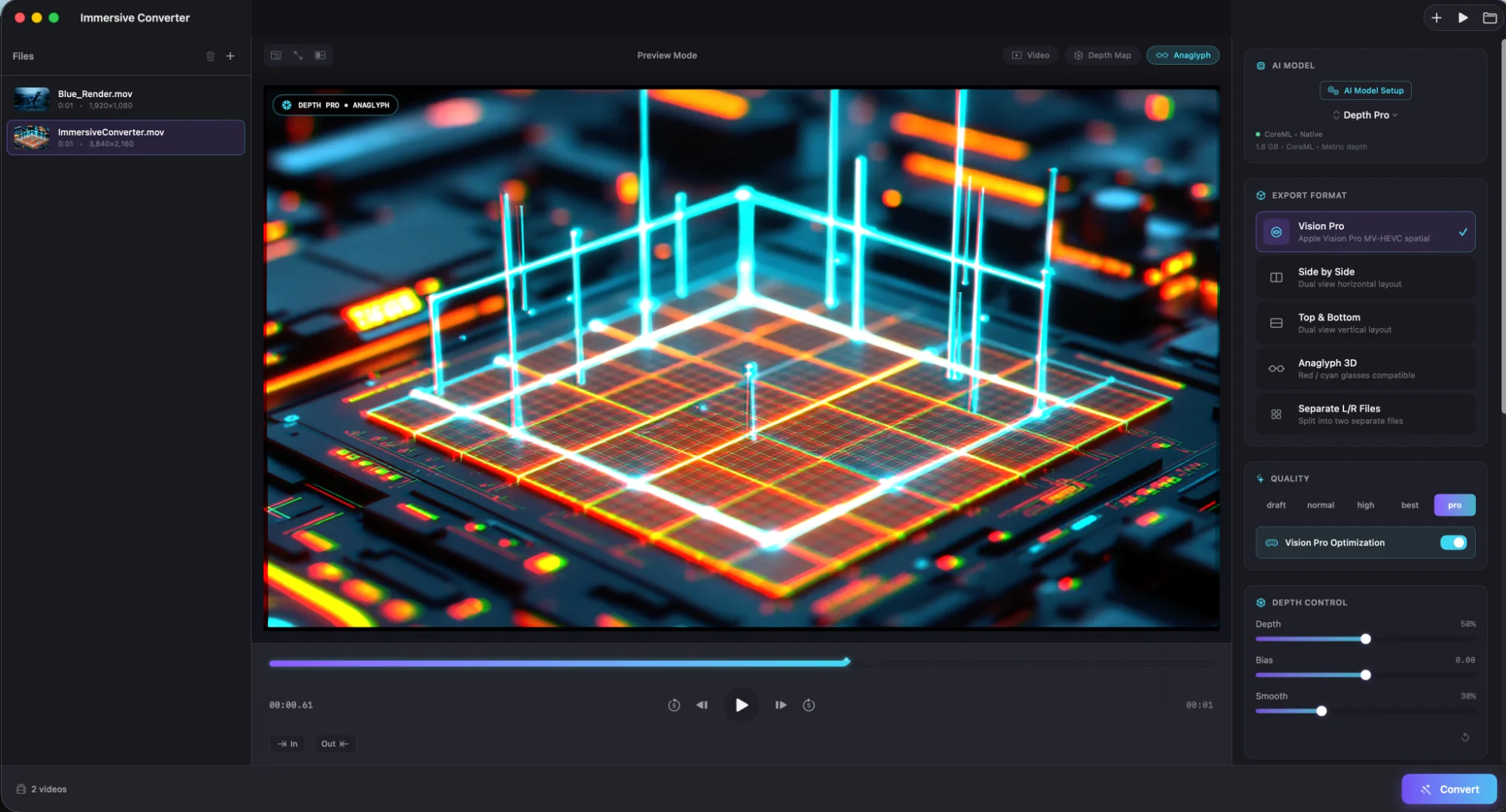
Three Steps. Zero Learning Curve.
Drop your video, preview in real‑time, export. Our AI handles the complex depth estimation while you focus on the creative decisions.
Import
Drag any 2D video into the app. Select your target format — Vision Pro, VR, or professional pipelines.
Preview
Fine‑tune depth, bias, and smoothing in real‑time. Switch between video, depth map, and anaglyph views.
Export
Hit Convert and let AI do the work. Batch processing supported. Audio automatically preserved.
Powered by Depth Pro.
Built on Apple's groundbreaking Depth Pro model — the same technology behind professional film and photography depth estimation. Running natively on Apple Silicon through CoreML for unprecedented speed and privacy.
Zero‑Shot Monocular Depth
Depth Pro produces sharp, high‑resolution depth maps from single images without requiring stereo pairs or camera calibration.
Metric Depth with Absolute Scale
Unlike relative depth models, Depth Pro outputs real‑world metric distances — critical for accurate stereoscopic 3D conversion.
Sub‑Second Inference
Optimized CoreML graph runs at 0.3s per frame on M1. Multi‑frame batching and Metal acceleration deliver real‑time preview.
100% On‑Device Privacy
Your videos never leave your Mac. No cloud uploads, no API calls, no data collection. Complete creative control stays with you.
Video to Depth Map.
Drag the slider to see how our AI analyzes your video and generates precise depth information.
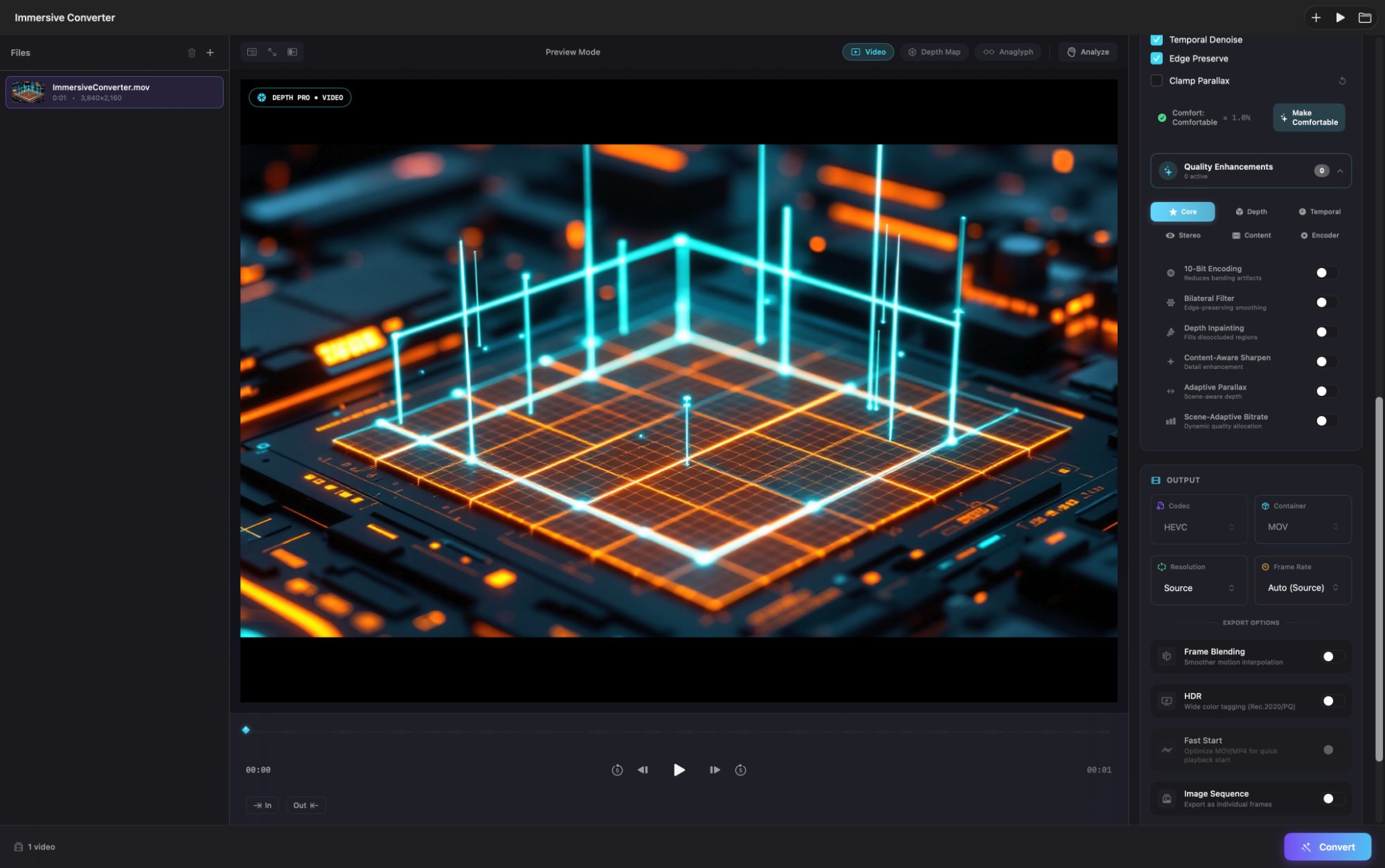
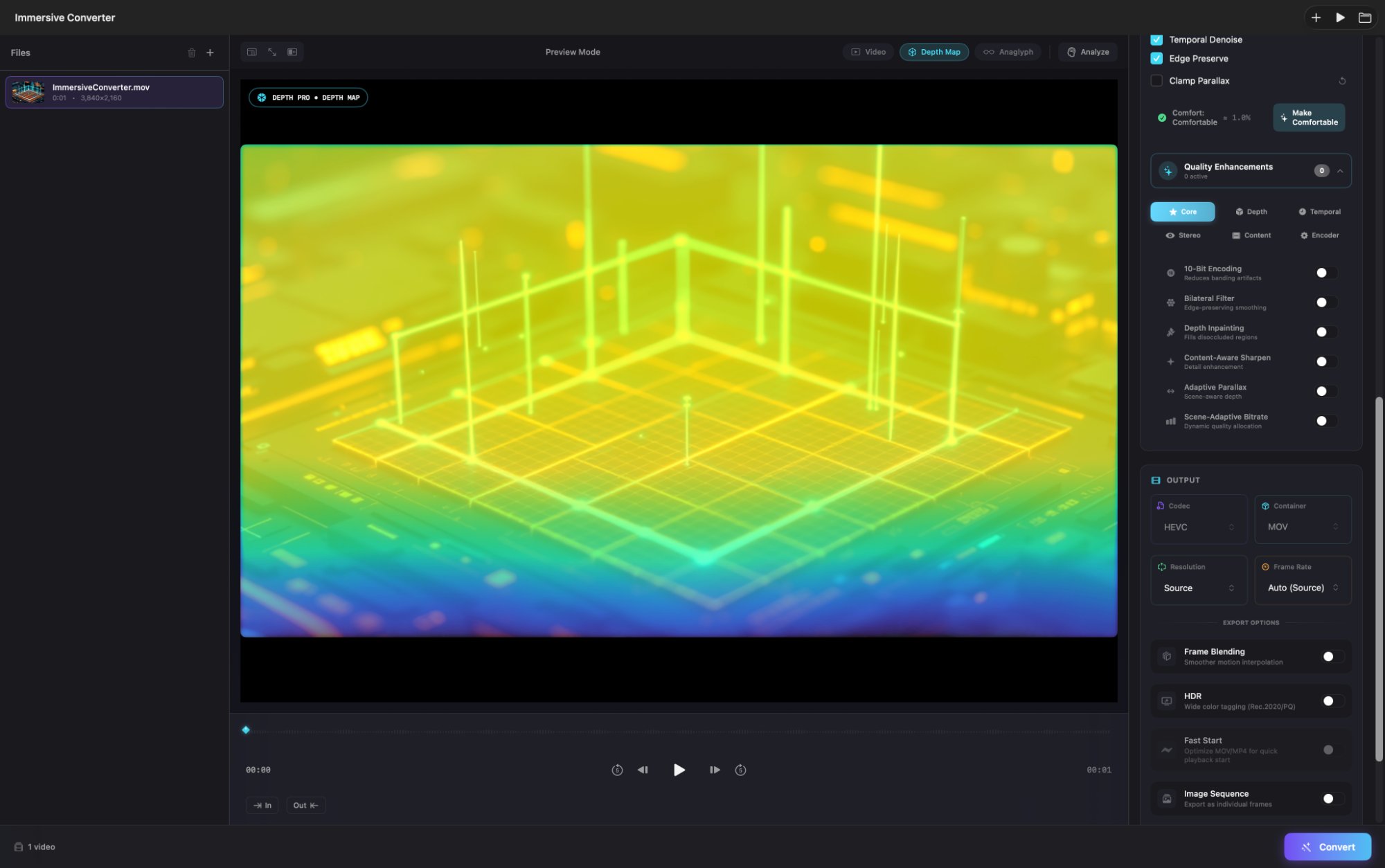 Video Preview
Depth Map
Video Preview
Depth Map
Cinema-Grade Precision.
AI-powered scene analysis, 21 professional enhancements, interactive depth editing — and 4 AI models to match your quality and speed needs.
4 AI Depth Models PRO
Apple Depth Pro for speed, DA V3 Giant for quality, DepthCrafter for temporal consistency. Match your workflow.
AI Scene Analysis
IC Assistant automatically detects scene types — talking head, action, cinematic, landscape — and optimizes depth settings for each.
21 Quality Enhancements
Six categories of pro processing: Core, Depth, Temporal, Stereo, Content, and Encoder enhancements for cinema-grade output.
ITU-R Comfort Safety
Real-time comfort estimation based on ITU-R guidelines. One-click "Make Comfortable" for safe extended viewing.
Crash Recovery
Automatic checkpointing during long exports. Resume interrupted renders after crash or power loss. Never lose work.
8 Output Formats
Vision Pro MV-HEVC, SBS, Top-Bottom, Anaglyph, Separate L/R, RGBD, Spatial Photos, and Image Sequences.
Precision Depth Controls
Fine‑tune depth intensity, convergence bias, and smoothing. Shape the 3D effect exactly how you want it.
Real‑Time Preview
See changes instantly. Toggle between video, depth map, and anaglyph views as you dial in the perfect look.
Upscale & Frame Rate
Boost resolution up to 2× and interpolate to 90fps. Frame blending keeps motion smooth and natural.
Pro Advanced Tools
Temporal denoise, edge preservation, parallax clamping. One‑click "Make Comfortable" for optimal viewing.
Format Options
Codec: HEVC/H.264/ProRes. Container: MOV/MP4. Resolution presets from Source to 2160p. VR packaging with metadata injection.
Batch Processing
Add multiple files, set options once, click Convert All. Progress and ETA display as each job renders.
Every Detail. Perfected.
Six categories of advanced processing features to deliver cinema-grade spatial video.
Core Enhancements
- 10-Bit Encoding — Eliminates banding
- Bilateral Filter — Edge-preserving smooth
- Depth Inpainting — Fills occlusion holes
- Content-Aware Sharpen
- Adaptive Parallax
- Scene-Adaptive Bitrate
Depth Enhancements
- Detail Transfer — Preserves textures
- Cross-Bilateral Upsample
- Depth Normalization
- Sub-Pixel Refinement
- Multi-Scale Depth
Temporal Enhancements
- Adaptive Temporal — Motion-aware
- Temporal Quality — No bitrate pumping
- Optical Flow — Motion blending
Stereo Enhancements
- Context Inpainting — Neural fill
- Stereo Consistency — L/R matching
- Text Overlay Fix — No ghosting
Content Enhancements
- Portrait Mode — Face depth
- Action Mode — Fast motion
- Cinematic Grading — Foreground pop
Encoder Enhancements
- Perceptual Rate — Smart bit allocation
- Depth-Aware Compression
One App. Every 3D Format.
Export to Apple Vision Pro, Meta Quest, YouTube VR, and professional post‑production pipelines — all from a single conversion.
Spatial Video
Export MV‑HEVC spatial .mov files for Apple Vision Pro. Requires compatible macOS/hardware.
Side‑by‑Side
SBS stereo for Quest, YouTube VR, and VR headsets. Auto‑switches to H.264/MP4.
Top‑Bottom
TB stereo (stacked vertically) for VR players and platforms. Auto‑switches to H.264/MP4.
Separate L/R
Output two separate video files (Left + Right) for post-production workflows.
RGBD Export
Color+depth video (ProRes 4444 MOV) or Alpha/Depth‑only PNG sequences for advanced pipelines.
Anaglyph
Red/cyan stereo for legacy displays and quick depth verification checks.
Pay Once. Own Forever.
No subscriptions. No accounts. No cloud fees. Powerful AI conversion that's yours to keep.
One‑time purchase. Yours forever.
- Apple Depth Pro AI model (CoreML)
- AI Scene Analysis (9 scene types)
- 21 Quality Enhancements
- Text Overlay Fix & ITU-R Comfort
- Crash Recovery & Checkpointing
- 8 output formats & Batch processing
macOS 15.6+ · Apple Silicon recommended
Tailored solutions for your organization.
- All Standard Edition features
- Custom development & integrations
- Volume licensing
- Priority support & SLA
- Custom AI model training
- Dedicated account manager
Let's discuss your requirements
Questions? We've Got Answers.
Check our documentation or reach out directly — we're here to help you create amazing spatial content.
User Guide
Step‑by‑step guides, tips, and best practices for getting the most out of the app.
Read the docsFrequently Asked Questions
Never. All processing happens locally on your Mac. Your videos never leave your device.
No. Standard Edition includes bundled CoreML models that work out of the box with no system changes required.
Confirm your system supports MV‑HEVC stereo encoding. Requires macOS 15.6+ and compatible hardware. If unsupported, Vision Pro export will be unavailable.
RGBD packs depth into the alpha channel. Other codecs may drop alpha, destroying depth data. ProRes 4444 preserves alpha reliably.
Clear the render range with the X key, then retry. The app only processes frames within the selected In/Out range.
Audio passthrough depends on container/codec and export path. Try .mov output if .mp4 fails, and verify the source file has audio.
Reduce the Depth slider or enable Clamp Parallax in Pro Advanced settings. Use "Make Comfortable" to auto‑enable safe depth clamping.
Pick a VR180/360 packaging preset (SBS or TB) — it auto‑switches to H.264/MP4 and injects VR metadata for YouTube compatibility.
Requires macOS 14.0+ and Apple Silicon (M1/M2/M3/M4). For MV‑HEVC spatial video export, you need macOS 15.0+ with M2 or newer chip. Intel Macs are not supported.
Standard includes CoreML Depth Pro, all export formats, and batch processing. Pro adds DA V2 Large model, ONNX runtime support, advanced depth controls (parallax clamping, edge feathering, temporal smoothing), and priority support.
Depth Pro is Apple's state‑of‑the‑art monocular depth estimation model. It produces sharp, metric‑accurate depth maps from single images — no stereo camera required. We run it natively on Apple Silicon via CoreML for maximum performance.
Yes. Drag multiple files into the queue, configure settings once, and let it run. Each video processes sequentially with the same depth and export settings.
Depth estimation runs at ~0.3s per frame on M1. A 1‑minute 30fps video (~1800 frames) takes roughly 9 minutes for depth pass, plus encoding time. M2/M3/M4 chips are faster. Draft mode is 2–3× quicker.
Any video format macOS can decode: MP4, MOV, MKV, AVI, ProRes, HEVC, H.264, and more. If QuickTime or AVFoundation can read it, so can we. Up to 8K resolution.
Yes. We support loading external depth maps (grayscale video or image sequences) to bypass AI estimation. Useful for VFX pipelines with pre‑computed depth from other tools.
Not currently. However, we offer a 14‑day refund policy through the App Store if the app doesn't meet your needs. Test on your hardware risk‑free.
Immersive Converter is designed for 2D‑to‑3D conversion. iPhone 15 Pro spatial videos are already 3D — they play directly on Vision Pro without conversion. Use this app for your existing 2D footage.
We believe tools should be owned, not rented. Pay once, use forever. All processing is local — there are no servers to maintain. Future updates included for the major version you purchased.